Fighting
Street Fighter II': Hyper Fighting
Choose from twelve fighters in the fast 1992 arcade edition.
KeyboardPlay
Review and accept the agreement before playing.
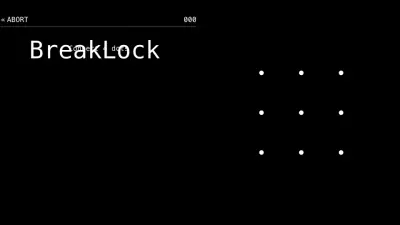
BreakLock combines a three-by-three pattern grid with Mastermind-style deduction. Discover a hidden ordered path by drawing guesses and reading the clues after each attempt.
Choose Play now. Select Easy and Practice, then START. Hold the mouse button on a dot, drag through four different dots and release to submit the pattern.
Begin in Practice so the timer does not distract you. A filled clue means the dot and its position are correct; a hollow clue means the dot belongs in the pattern but at a different position.
After a complete guess, the game shows counts of correctly placed dots and correct dots in the wrong order. Those clues summarize the whole attempt; they do not label which individual dot is correct.
Keep your previous guesses visible and compare them. If a guess contains no useful dots, eliminate that group from future attempts rather than repeating it with a different order.
Start with a clear sequence of different dots. If the clues show the right dots in the wrong order, keep those candidates and test another order instead of replacing every dot at once.
A good guess gains information even when it does not solve the lock. Compare attempts that differ by a small change, and use the clue totals to decide which explanation is still possible.
Easy asks for four dots, Medium five and Hard six. Follow the number displayed above the grid; releasing a path too early does not submit a complete guess.
Use a continuous mouse drag, or a finger drag on touchscreens. Practice is useful for learning the input. ABORT returns to setup; do not rely on reloading to preserve an unfinished deduction session.
Click inside the game before using the keyboard. Touch gestures are performed on the game board.
| Key | Action |
|---|---|
| Mouse drag / touch drag | Draw the requested number of dots |
| START / ABORT | Start / return to setup |
Runs in this page without a plugin or account. The game files still load over the network.
The source supports touch input. Small-screen layout is checked separately from testing a physical phone.
Favorites bookmarks the page. Game progress and settings belong to the browser and do not sync to another device.
Fix a game that will not load · Understand browser game saves
Choose Play now. Select Easy and Practice, then START. Hold the mouse button on a dot, drag through four different dots and release to submit the pattern.
Favorites bookmarks the page. Game progress and settings belong to the browser and do not sync to another device. Use a continuous mouse drag, or a finger drag on touchscreens. Practice is useful for learning the input. ABORT returns to setup; do not rely on reloading to preserve an unfinished deduction session.
BreakLock · HTML5 · 2026-11-19
Guide maintained by WASM Arcade Directory ·
BreakLock — BreakLock — Game rules and controls checked against the original source and a short browser playtest.
This is an independent WasmArcade game page. The game interface may use a different language from this guide.