Fighting
Street Fighter II': Hyper Fighting
Choose from twelve fighters in the fast 1992 arcade edition.
KeyboardPlay
Keyboard recommended. Touch controls are not confirmed for this player.
Review and accept the agreement before playing.
Play Dragon Ball Z free online with the 1993 arcade game, revision B. This side-view fighter from Banpresto puts familiar Dragon Ball characters into one-on-one bouts with close attacks and airborne action. Start the external browser player without installing an app; this is the original arcade edition, not FighterZ, a console port or the 1994 sequel.
Select Play now, allow the external player if asked, then click Click to Begin in the Internet Archive player. Wait for the opening screens and click the game. Press 5 to insert a virtual coin, then 1 to start player one. Use the arrows to highlight a fighter and Left Ctrl to confirm. Wait for the bout before testing movement and attacks.
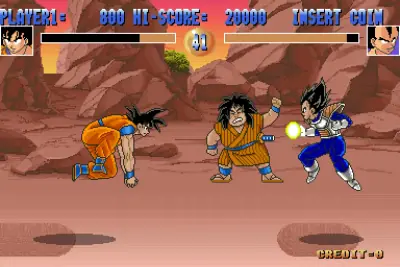
Look for CREDIT increasing and then PLAYER1 with a score during your fight. The automatic demonstration also shows moving fighters, but it is not your game. If a tap is missed, hold the key briefly. The coin key here is 5; the Right Shift and Enter instructions used by some other games on this site do not apply.
This is a round-based arcade fighting game. Goku, Gohan and Piccolo belong to its Dragon Ball cast; the running build also displays Ginyu Force characters in its demonstrations. Character portraits, life bars and a round timer frame the fights. A modern Dragon Ball move list or console button guide can therefore be misleading.
The sequel Super Battle is a separate game. Revision B is also a particular revision of the first arcade title, not a promise that every Dragon Ball game is included. Choose a fighter for a first session and learn that character’s reach before changing characters.
Begin by walking toward and away from the opponent with the horizontal arrows. Stop just outside the opponent’s attack range and use a single attack, rather than holding every action key. Watch the life bars and your recovery after a missed attack; the visible character animation is a better timing guide than rapidly tapping the keyboard.
Fights can move away from a simple ground-level exchange. Recheck distance when either fighter changes height, and avoid chasing an airborne opponent with the same repeated ground attack. Learn one reliable close-range response first, then experiment with the other buttons one at a time. This guide does not invent special-move recipes from a different Dragon Ball release.
MAME lists the action inputs as P1 Button 1 through P1 Button 4. They are Left Ctrl, Left Alt, Space and Left Shift respectively in this player. These are arcade button numbers, not four levels of punch strength. The provider does not give those entries descriptive move names, so the table preserves the labels actually inspected.
For a controlled practice session, tap one action, release it and observe the animation before trying another. Direction plus an action may behave differently from a neutral press. Tab opens Input (this Machine) to review the mapping; close the menu with Tab to resume. A menu covering the fight can make an otherwise working game appear unresponsive.
Player 1 defaults were read from the MAME menu: Tab → Input (this Machine). Left Ctrl, Left Alt and Left Shift mean the keys on the left of the keyboard. Click the game before using keys; custom mappings take precedence.
| Key | Action |
|---|---|
| 5 | Insert a virtual coin |
| 1 | Start player 1 |
| Arrow keys | Select fighter / move in a bout |
| Left Ctrl | Arcade P1 Button 1 / confirm selection |
| Left Alt | Arcade P1 Button 2 |
| Space | Arcade P1 Button 3 |
| Left Shift | Arcade P1 Button 4 |
| Tab | Open / close MAME input menu |
Desktop Chrome on macOS was used to check startup and keyboard input on October 28, 2026. The game runs in an external Internet Archive player. No app or browser plugin installation is required; game and emulator resources still download after you start.
Android phones and iPhone/iPad have not been tested on physical devices. Touch controls, simultaneous button presses, sound and fullscreen behavior are unverified. Use a desktop keyboard for the verified setup; a smaller screen alone does not establish phone compatibility.
A page favorite only bookmarks the game. Automatic progress recovery and the provider's save-state or online-play features have not been verified. Reloading can lose the current session. For missing sound, interact with the game and check the browser tab and system volume; for ignored keys, click the game again.
Fix a game that will not load · Understand browser game saves
No. This page runs Dragon Ball Z (rev B), the 1993 Banpresto arcade game. It is a different game from FighterZ and Super Battle.
No. You do not install a client or plugin, but the external player still loads emulator and game data over the network. Physical Android and iPhone/iPad play has not been verified.
Version: Dragon Ball Z (rev B), 1993 Banpresto arcade. The Archive item identifies the dbz machine; the MAME driver distinguishes revision B, revision A and Dragon Ball Z 2: Super Battle (1994). The facts and controls here refer only to revision B.
Guide maintained by WASM Arcade Directory ·
Internet Archive — Dragon Ball Z — Exact arcade version and public Embed Code checked; startup and player-input tests recorded October 28, 2026. This was a short gameplay check, not a complete playthrough.
WASM Arcade Directory is an independent guide site, separate from Internet Archive and the original game publishers. The embedded player's interface and game language may differ from this guide. No player totals, ratings or network multiplayer results are claimed.