Fighting
Street Fighter II': Hyper Fighting
Choose from twelve fighters in the fast 1992 arcade edition.
KeyboardPlay
Keyboard recommended. Touch controls are not confirmed for this player.
Review and accept the agreement before playing.
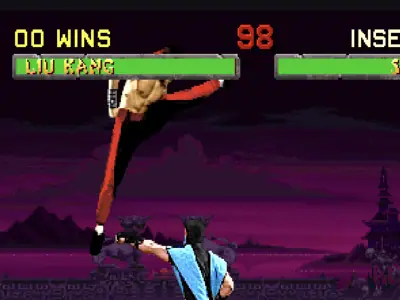
Play Mortal Kombat II free online with Midway’s 1993 arcade fighting game, revision L3.1. Select one of twelve fighters, win rounds and learn a five-button system with a dedicated block input. The browser player requires no installed client. This page covers the arcade edition, rather than a console port or a later Mortal Kombat sequel.
Select Play now, allow the external player if asked and press PLAY NOW inside it. Wait for revision 3.1 to boot, then click the game to enable the keyboard. If CMOS INVALID and ANY BUTTON TO CONTINUE appear, press Z. Press Right Shift until the title screen shows CREDITS: 2, then Enter. Click again if the keyboard-focus message appears. Choose a fighter with the arrows, confirm with Z and wait through the opponent screen and brief transitions until FIGHT.
Right Shift is the Shift key on the right; credits are virtual button presses, not a payment. Check the credit counter before starting; brief coin presses can be missed. The player-one marker on the character grid distinguishes a started game from the automatic demonstration. If the frame says Click to make keyboard keys work, click it before sending more keys.
Mortal Kombat II’s twelve selectable fighters include Liu Kang, Kung Lao, Kitana, Mileena and Baraka. The arcade roster and visual style are part of this edition; later games’ expanded character lists do not apply. Start with one fighter to learn reach and recovery rather than switching after every loss.
MKII has high punch, low punch, high kick, low kick and block. It does not have the run button or the MK3-style preset combo system used by Ultimate Mortal Kombat 3. Walking, jumping, spacing and individual move decisions therefore matter without a run-meter plan.
Use X to block: simply holding backward is not the defense input. Combine down and block for crouching defense as needed, while watching for attacks from a different height. Release block to act, and avoid pressing every action at once; it becomes harder to tell why a move did not appear.
Down plus Z performs the basic crouching high-punch uppercut. Try it as an answer to a nearby jump, then watch how long the fighter takes to recover. An opponent outside its reach can punish the miss. Use a grounded kick to learn distance before relying on repeated uppercuts or forward jumps.
Practice a short loop: move into range, use one attack, retreat and defend. Test high and low attacks separately and note which ones leave you exposed. Once that rhythm is reliable, add one character-specific special instead of trying a long move list during every exchange.
The FINISH HIM or FINISH HER prompt follows a won match and gives a limited opportunity for a finishing move. It is not needed to win the ordinary rounds. Fatalities, Friendships and Babalities have distinct requirements; this short gameplay check does not certify every finishing input. The game contains graphic violence.
Player 1 defaults from the embedded player's Controls Settings. Right Shift means the Shift key on the right of the keyboard. Click inside the game before pressing keys; remapped keys take precedence.
| Key | Action |
|---|---|
| Right Shift | Insert virtual coin (two credits to start in this build) |
| Enter | Start player 1 |
| Arrow keys | Select / move / jump / crouch |
| Z | High punch / confirm selection |
| X | Block |
| A | High kick |
| S | Low punch |
| Q | Low kick |
| E | Alternate block (Block 2) |
Desktop Chrome on macOS was used to check startup and keyboard input on October 29, 2026. The game runs in an external RetroGames.cc player. No app or browser plugin installation is required; game and emulator resources still download after you start.
Android phones and iPhone/iPad have not been tested on physical devices. Touch controls, simultaneous button presses, sound and fullscreen behavior are unverified. Use a desktop keyboard for the verified setup; a smaller screen alone does not establish phone compatibility.
A page favorite only bookmarks the game. Automatic progress recovery and the provider's save-state or online-play features have not been verified. Reloading can lose the current session. For missing sound, interact with the game and check its speaker control; for ignored keys, click the game again.
Fix a game that will not load · Understand browser game saves
Mortal Kombat II uses a dedicated block button. X is the default block key in this embedded player; the Street Fighter back-to-block rule does not apply.
MKII has no run button. This page verifies a short single-player browser session, not online matchmaking, save recovery or physical phone compatibility.
Version: Mortal Kombat II (rev L3.1), Midway arcade, 1993. The public RetroGames.cc embed and the game’s revision 3.1 boot screen identify this version. The FBNeo driver documents the arcade inputs and this revision. Home-console differences are outside this guide.
Guide maintained by WASM Arcade Directory ·
RetroGames.cc — Mortal Kombat II — Exact arcade version and public Embed Code checked; startup and player-input tests recorded October 29, 2026. This was a short gameplay check, not a complete playthrough.
WASM Arcade Directory is an independent guide site, separate from RetroGames.cc and the original game publishers. The embedded player's interface and game language may differ from this guide. No player totals, ratings or network multiplayer results are claimed.