Fighting
Street Fighter II': Hyper Fighting
Choose from twelve fighters in the fast 1992 arcade edition.
KeyboardPlay
Keyboard recommended. Touch controls are not confirmed for this player.
Review and accept the agreement before playing.
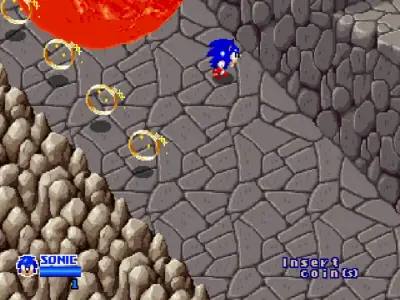
Play SegaSonic the Hedgehog free online in the Sega System 32 arcade version, Japan revision C. Guide player-one Sonic through an isometric escape course of cages, traps and moving hazards. This is the trackball-based arcade game, rather than the side-scrolling Mega Drive Sonic. The external player runs in your browser without installing an app or plugin; it still loads emulator and game files over the internet.
Select Play now, allow the external player and click its PLAY NOW button. Wait through the arcade startup, then click the game. Press Right Shift for a virtual coin and Enter to start player one. The tested session used Sonic; Z confirms when needed. Wait through the opening capture scene. At BREAK, move toward the bars and press Z to jump into them, then follow the escape route with the arrows and Z.
Check the credit display before starting; the coins are virtual and require no payment. Click the game again if Click to make keyboard keys work appears. The introduction and automatic demonstration are not movement tests. Wait for the playable cage and verify that a direction changes Sonic's position before continuing.
The original cabinet uses a trackball and one action button. In this player, Controls Settings maps Track Y Dec/Inc to Up/Down and Track X Dec/Inc to Left/Right. Z is P1 Button 1, used for jumping. The arrow keys drive the trackball axes; Z is not the spin-dash charge system from the console games.
Hold adjacent directions together for diagonal movement, then combine movement with Z for a travelling jump. The camera looks down at an angle, so the floor's diagonals are not ordinary side-scrolling platforms. Practise short movements on the opening floor and watch the landing position before attempting a narrow path. Keyboard axes do not reproduce the feel of a physical trackball.
The opening bars teach movement and jumping before the chase expands into other traps. Move toward the marked break point rather than jumping in place far from it. On later ground, look ahead at the direction of the path and the moving hazards instead of following Sonic's animation alone.
Rings and the visible energy bar are separate things to watch. In the short check, Sonic could move, jump and collect rings beside the rolling hazards; damage could still interrupt that movement. Do not cross a dangerous lane solely for a ring. Learn a safe line through one obstacle before trying to collect everything.
The verified setup is player-one Sonic with arrows and Z on desktop Chrome. The arcade has a design for up to three cabinet players and features Sonic, Mighty and Ray, but this test does not establish other-player controls, gamepad support or multiplayer between devices.
If Sonic stands still while the scene animates, click the picture and recheck the four Track controls. A loaded opening scene does not prove that input works. Reloading starts a new loading process and may lose the session; save recovery and complete level progression were not tested. Physical phone touch controls remain unverified.
Player 1 defaults from the embedded player's Controls Settings. Right Shift means the Shift key on the right of the keyboard. Click inside the game before pressing keys; remapped keys take precedence.
| Key | Action |
|---|---|
| Right Shift | Insert virtual coin |
| Enter | Start player 1 |
| Arrow keys | Drive the trackball X/Y axes; adjacent directions combine |
| Z | Jump / action (P1 Button 1) |
Desktop Chrome on macOS was used to check startup and keyboard input on October 31, 2026. The game runs in an external RetroGames.cc player. No app or browser plugin installation is required; game and emulator resources still download after you start.
Android phones and iPhone/iPad have not been tested on physical devices. Touch controls, simultaneous button presses, sound and fullscreen behavior are unverified. Use a desktop keyboard for the verified setup; a smaller screen alone does not establish phone compatibility.
A page favorite only bookmarks the game. Automatic progress recovery and the provider's save-state or online-play features have not been verified. Reloading can lose the current session. For missing sound, interact with the game and check its speaker control; for ignored keys, click the game again.
Fix a game that will not load · Understand browser game saves
SegaSonic is an isometric System 32 arcade escape game originally controlled with a trackball. It is not the side-scrolling Mega Drive release and this guide does not assign its console spin-dash commands to the arcade player.
Physical Android and iPhone/iPad have not been tested. A narrow layout or visible touch buttons does not prove trackball movement, simultaneous jumping, sound or fullscreen works on those devices. Use the verified desktop keyboard setup.
Version: SegaSonic The Hedgehog (Japan, rev. C), Sega System 32. The public Embed Code, title screen and FBNeo/MAME set descriptions identify this build. The title displays © SEGA 1992; this identifies the displayed copyright, not a separately verified commercial launch date. This page does not substitute the prototype or a console game.
Guide maintained by WASM Arcade Directory ·
RetroGames.cc — SegaSonic the Hedgehog — Exact arcade version and public Embed Code checked; startup and player-input tests recorded October 31, 2026. This was a short gameplay check, not a complete playthrough.
WASM Arcade Directory is an independent guide site, separate from RetroGames.cc and the original game publishers. The embedded player's interface and game language may differ from this guide. No player totals, ratings or network multiplayer results are claimed.