Platformer / Adventure / Action
Alien Hominid
Outrun the FBI in the original Flash run-and-gun.
KeyboardPlay
Keyboard & mouse recommended. Touch controls are not confirmed for this player.
Review and accept the agreement before playing.
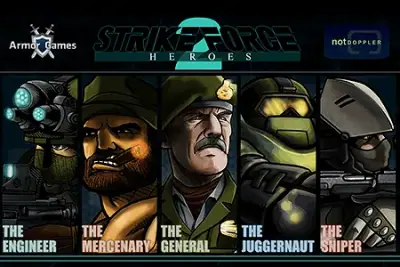
Strike Force Heroes 2 is a side-view sci-fi shooter with customizable soldiers and equipment. Its provider description places the mission around warships in space and identifies five soldiers to customize.
Fight through enemy encounters while choosing a soldier and equipment suited to the mission. The player uses keyboard movement with mouse aiming and shooting.
Locate the reload and weapon-switch keys before starting a fight. Moving, aiming and reloading are separate actions; practice changing direction while keeping the cursor on a target before relying on a stationary firing position.
Strike Force Heroes 2 offers five customizable soldiers, and the equipment choices include weapons, attachments and armor. Start with one soldier long enough to understand the setup you are improving. Changing soldier and equipment after every loss makes it difficult to tell whether the problem is positioning or the loadout.
Inspect all equipment slots when reviewing an upgrade. A different primary weapon changes only part of the setup; the secondary option and supporting equipment also deserve attention. Choose purchases around the encounters you are struggling with instead of treating the newest weapon as an automatic solution to every mission.
Movement and mouse aiming are independent, which lets you change position while keeping the cursor on an opponent. Practice that coordination before relying on stationary fire. If you are repeatedly defeated while standing still, review where you could move between shots rather than changing weapons immediately.
Locate reload and weapon-switch controls before a busy encounter. When the current weapon needs reloading, judge the immediate space and whether switching is a useful response. Avoid entering a new fight without checking your ammunition; a strong weapon contributes little during an avoidable interruption at the wrong moment.
Armor Games distinguishes the campaign from a slot-machine feature that can award rare weapons. Keep the campaign objective as your reference when deciding what to improve. A random reward may be interesting, but repeated equipment changes do not substitute for understanding where a mission is going wrong.
Learn the selected soldier’s killstreak action and watch for a useful opportunity to activate it. Consider the current encounter instead of pressing the button as soon as you remember it exists. After a loss, separate missed shots, unsafe movement and equipment limitations so the next attempt addresses a specific cause.
The following controls are listed by Miniplay. Check the in-game instructions for remapping and additional actions.
| Input | Action |
|---|---|
| WASD | Move |
| Mouse movement | Aim |
| Left mouse button | Shoot |
| R | Reload |
| Q | Switch weapon |
| E | Killstreak |
The Play now button opens the configured Miniplay player on this page. Availability and compatibility depend on the provider; not every title has been tested through a full game session.
Armor Games describes weapons, attachments, armor upgrades and camouflage for five soldiers. Its quest list also distinguishes primary and secondary weapons, so review the whole loadout rather than only the primary slot.
Miniplay lists R for reload, Q for switching weapons and E for killstreak. Armor Games lists additional alternatives, but the current player’s own instructions should decide which bindings you use.
Maintained by WASM Arcade Directory · Guide updated · Catalog snapshot .
Your enemies have taken some war ships in outer space and you've been sent to retrieve them. Customize five soldiers with hundreds of weapons, accessores, cammo and upgrades.
Miniplay — Strike Force Heroes 2
These original guides explain game rules, practical decisions and common mistakes using the sources listed above. They are source-based guidance; a content review does not establish a completed playthrough or verified support on every device. This independent directory is not affiliated with game publishers. Favorites are separate from in-game saves. Sources and method · Contact and player support.