Fighting
Street Fighter II': Hyper Fighting
Choose from twelve fighters in the fast 1992 arcade edition.
KeyboardPlay
Keyboard recommended. Touch controls are not confirmed for this player.
Review and accept the agreement before playing.
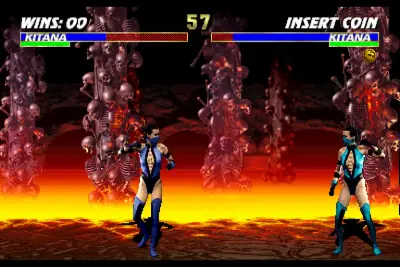
Play Ultimate Mortal Kombat 3 free in your browser with the 1995 Midway arcade game, revision 1.2. Choose a fighter and work through one-on-one bouts using four attacks, a dedicated block button and a run button. No app installation is required. This is the arcade revision, not Mortal Kombat Trilogy or a home-console conversion.
Select Play now, allow the external player if prompted and click Click to Begin in Internet Archive. Click the game after loading. If the first boot says CMOS INVALID and ANY BUTTON TO CONTINUE, press Left Ctrl. Press 5 twice for the two virtual credits shown by this build, then 1. Confirm the normal Mortal Kombat mode with Left Ctrl, choose a fighter with the arrows and confirm. Wait through the opponent screen until FIGHT. If CHOOSE YOUR DESTINY appears, use the arrows to choose a tower, such as NOVICE, and confirm with Left Ctrl.
Two credits here are virtual button presses, not a payment. A title animation is not your match: check the mode and fighter-selection screens. If a brief press is missed, hold it momentarily. These MAME defaults differ from the RetroGames.cc mappings on some other pages, so use this page’s table.
Ultimate Mortal Kombat 3 expands and revises MK3, bringing fighters such as Scorpion and Kitana into this arcade lineup. It keeps MK3’s run system and preset combo sequences. Mortal Kombat II uses a different roster and lacks this run button, so its pacing and combo advice should not be copied unchanged.
The mode screen also offers 2-on-2 and tournament options. This page’s short gameplay check used the normal one-on-one route against the computer. A menu option is not proof of network multiplayer, and this guide does not claim an online opponent-matching service.
Holding away from the opponent does not replace the dedicated block button. Use Left Alt for defense; combine it with down for crouching defense when appropriate. Watch the opponent’s attack height and release block deliberately when you want to counter, rather than pressing attack and block continuously.
Hold X together with the direction toward the opponent to run. The run meter limits how long you can keep doing this. Use a short dash to close a gap, then stop at an attack distance you understand. Running into every exchange empties your resource and makes your approach predictable.
Choose one fighter and learn one grounded attack, one defensive response and one short combo before chasing long sequences. A high kick reaches differently from a low punch; test them separately at a steady distance. For an uppercut, crouch and use high punch, but do not treat a missed uppercut as safe to repeat.
Change only one thing each round: distance, attack timing or your response to a jump. Character-specific specials and finishing moves require their own spacing and timing. This page does not promise an easy fatality button or verified execution of every finisher. The game contains graphic combat and finishing animations.
Player 1 defaults were read from the MAME menu: Tab → Input (this Machine). Left Ctrl, Left Alt and Left Shift mean the keys on the left of the keyboard. Click the game before using keys; custom mappings take precedence.
| Key | Action |
|---|---|
| 5 | Insert virtual coin (two credits to start in this build) |
| 1 | Start player 1 |
| Arrow keys | Select / move / jump / crouch |
| Left Ctrl | High punch / confirm selection |
| Left Alt | Block |
| Space | High kick |
| Left Shift | Low punch |
| Z | Low kick |
| X + toward opponent | Run; uses the run meter |
| Tab | Open / close MAME menu |
Desktop Chrome on macOS was used to check startup and keyboard input on October 28, 2026. The game runs in an external Internet Archive player. No app or browser plugin installation is required; game and emulator resources still download after you start.
Android phones and iPhone/iPad have not been tested on physical devices. Touch controls, simultaneous button presses, sound and fullscreen behavior are unverified. Use a desktop keyboard for the verified setup; a smaller screen alone does not establish phone compatibility.
A page favorite only bookmarks the game. Automatic progress recovery and the provider's save-state or online-play features have not been verified. Reloading can lose the current session. For missing sound, interact with the game and check the browser tab and system volume; for ignored keys, click the game again.
Fix a game that will not load · Understand browser game saves
No. The embedded build is the 1995 Ultimate Mortal Kombat 3 arcade revision 1.2. Console additions and Trilogy’s roster are different.
The desktop browser test required no app or plugin installation. Emulator and game data still load over the network. Physical Android and iPhone/iPad play remains unverified.
Version: Ultimate Mortal Kombat 3 (rev 1.2), Midway arcade, 1995. Archive identifies emulator umk3. Its item has an inconsistent 1994 publication field; the game release is 1995, reported by the independent game reference; MAME is used here to identify the revision. Console character counts and exclusive modes are not assumed to apply.
Guide maintained by WASM Arcade Directory ·
Internet Archive — Ultimate Mortal Kombat 3 — Exact arcade version and public Embed Code checked; startup and player-input tests recorded October 28, 2026. This was a short gameplay check, not a complete playthrough.
WASM Arcade Directory is an independent guide site, separate from Internet Archive and the original game publishers. The embedded player's interface and game language may differ from this guide. No player totals, ratings or network multiplayer results are claimed.